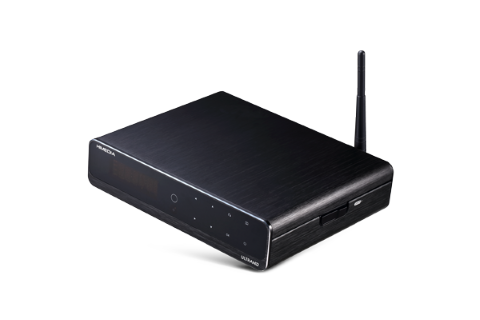
Note: Egreat A10 EN firmware includes “Release” version and “Beta” version,
“Release” version firmware will be updated per month, you can download it click here
“Beta” version firmware will be updated per week, which is only for some enthusiasts who like to test some new problems and solved problems in advanced.
This post is Egreat A10 EN Beta Firmware (2016-12-29 v1.0.2.1 Beta), there maybe some problems, which is only for some enthusiasts test.
II. Recovery the firmware instructions
1.Please force to recovery this version firmware, user datas will be erased.
2.You can also upgrade the firmware by local USB upgrade, if your current firmware is 1.0.1.5V, but the below changelog function with * can’t be available.
3. The force to recovery this version firmware instruction, please click here.
III. Changelog
New: Adding Auto raw passthrough function, auto matching peripherals (operation guidance click here)
New: SMB/NFS auto search function (operation guidance click here)
New: Onekey switchover function on audio track and subtitle(operatino guidance click here)
New: Smart select playback time function
New: Movie details showed on the file UI
New: Adding movie details in the file playback(operation guidance click here)
New: Adding current temperature display in Fan setting
New: Adding blu-ray ISO sort on poster UI
Optimizing: Realtime update to information UI when playback
Optimizing: Improve the compatibility of 4K moives
Optimizing: BD/3D/4K/3D BD tag on poster
Optimizing: External subtitle setting function
Optimizing: Show last breakpoint time when resuming
Optimizing: Adding “year information’ on editting movie blank poster UI
Adjustment: Some UI design and operation tips
Adjustment: Initial search mode on poster UI
Adjustment: Making deep color more perfect
Adjustment: Online subtitle is closed temporarily ( Will be recovery soon)
Adjustment: Optimize the volumn adjustment bar *
Adjustment: Deleted “playback will be ended soon” tip
Fixed: Incorrect play in movie post
Fixed: The fast forward bar disappeared when press fast forward button
Fixed: The semitransparent words spoilted in some BD Menu
Fix: Some blu-ray movies can’t resume from breakpoint
Fix: 3D movie may be not smooth when playing BD menu
Fix: New adding custom font is completely compatible with srt subtitle font
Fix: Some of Add-ons on Vidon XBMC can’t work *
Note: This version temporarily closes online subtitle download function, but will be recovery in next version.
Note: Egreat A5 EN firmware includes “Release” version and “Beta” version,
“Release” version firmware will be updated per month, you can download it click here
“Beta” version firmware will be updated per week, which is only for some enthusiasts who like to test some new problems and solved problems in advanced.
This post is Egreat A5 EN Beta Firmware (2016-12-29 v1.0.2.1 Beta), there maybe some problems, which is only for some enthusiasts test.
II. Recovery the firmware instructions
1.Please force to recovery this version firmware, user datas will be erased.
2.You can also upgrade the firmware by local USB upgrade, if your current firmware is 1.0.1.5V, but the below changelog function with * can’t be available.
3. The force to recovery this version firmware instruction, please click here.
III. Changelog
New: Adding Auto raw passthrough function, auto matching peripherals (operation guidance click here)
New: SMB/NFS auto search function (operation guidance click here)
New: Onekey switchover function on audio track and subtitle(operation guidance click here)
New: Smart select playback time function
New: Movie details showed on the file UI
New: Adding movie details in the file playback(operation guidance click here)
New: Adding blu-ray ISO sort on poster UI
Optimizing: Realtime update to information UI when playback
Optimizing: Improve the compatibility of 4K moives
Optimizing: BD/3D/4K/3D BD tag on poster
Optimizing: External subtitle setting function
Optimizing: Show last breakpoint time when resuming
Optimizing: Adding “year information’ on editting movie blank poster UI
Adjustment: Some UI design and operation tips
Adjustment: Initial search mode on poster UI
Adjustment: Making deep color more perfect
Adjustment: Online subtitle is closed temporarily ( Will be recovery soon)
Adjustment: Optimize the volumn adjustment bar *
Adjustment: Deleted “playback will be ended soon” tip
Fixed: Incorrect play in movie post
Fixed: The fast forward bar disappeared when press fast forward button
Fixed: The semitransparent words spoilted in some BD Menu
Fix: Some blu-ray movies can’t resume from breakpoint
Fix: 3D movie may be not smooth when playing BD menu
Fix: New adding custom font is completely compatible with srt subtitle font
Fix: Some of Add-ons on Vidon XBMC can’t work *
Note: This version temporarily closes online subtitle download function, but will be recovery in next version.
changelog of Q5 Pro/Q10 Pro Android N firmware:
1. Android N OS running stable and smooth
Android N ช่วยให้การทำงานเร็ว เสถียรและสมูทมากขึ้น
2. Support Android N google play version
รองรับ Android H จาก google
3. Flawlessly support Smaba Upnp
Samba UPNP สมบูรณ์แบบ
4. System function perfectly upgraded from 5.1 to Android N with compatibility
กาทำงานร่วมกันสมบูรณ์แบบ ย้ายจาก 5.1 ไป N
5. Youtube updated to 4.10.7 and Netflix to 1.3.11
Youtube อัพล่าสุด 4.10.7
6. Homepage, Application Management, Media Center optimized, focus movement are more swift and smooth
ดัดแปลงและควบคุม เสริม ที่ หน้า Homepage , Applicaton และ อื่นๆ
7. Media Player upgraded and support mouse operation
Media plaey Upgrad ซัพพอตการเล่นเม้า
8. Local Media Playback Improved; Certain rare videos black screen, display ratio of 3D to 2D abnormal, and occasional subtitle defect issues fixed
9. Blue-ray video slow loading conditions improved and speed up
เล่น Blu ray โหลดได้แล้วขึ้น
10. Local Audio output improved and certain audio tracks unable to decode and output issue fixed
1.Repaired video stuttering and dropping in Youtube;
2.Redraw app icon, provide customization functions to change the icon at homepage (click menu to change the “MEDIA CENTER”,”ZDMC”,”BROWSER”and SETTING);
3.Fixes the issue that some of the keys cannot be used in some type of the air-mouse;
4.update the weather,file explorer,etc;
5.Solved many of other problems.
Incremental_OTA_Package Link: v1.0.39_to_v1.0.40_update.zip (Upgrade based on V1.0.39)
FileSize: 37.1 MB (38,972,666 字节)
MD5 :A23485D8D26952FF16684199227D2EA2