[TIP-TRICK] EWEAT X9 UPDATE Firmware วันที่ 13 เดือน 08 ปี 2020

[TIP-TRICK] EWEAT X9 UPDATE Firmware วันที่ 13 เดือน 08 ปี 2020

[vc_row][vc_column][vc_message message_box_color=”black”]

EWEAT X9 FIRMWARE

  • อัพเดดเรื่อง Netflix ให้เล่นได้
  • เปลี่ยน Playstore ใหม่
  • มีแอพ NETFLIX / DISNEYPLUS+ / YOUTUBE ลงไว้เลยในเครื่อง พร้อม APTIODE

หากสินค้าเกิดปัญหาขึ้นมาจากการแฟลชของลูกค้า ทางร้านไม่จำเป็นต้องรับผิดชอบ

ต่อการแฟลชเครื่องของลูกค้า เพราะเนื่องจากนี้เป็นเพียงวิธีแนะแนวการแก้ไขเท่านั้น

https://haloolahraga.com/biografi-dan-profil-ole-romeny-penyerang-liga-belanda-timnas-indonesia/

โปรดทำการแฟลชด้วยความระมัดระวังและขอสงวนสิทธิ์การรับประกัน[/vc_message][/vc_column][/vc_row][vc_row][vc_column][vc_message message_box_color=”mulled_wine”]DOWNLPD FIRMWARE EWEAT ล่าสุด X9[/vc_message][vc_btn title=”FIRMWARE EWEAT X9 คลิ๊กที่นี้” color=”danger” align=”center” button_block=”true” link=”url:https%3A%2F%2Fdrive.google.com%2Fu%2F0%2Fuc%3Fid%3D1h3RVhngRacpxfFOqsGuAYDmSSqTg74Mr%26export%3Ddownload|target:_blank”][/vc_column][/vc_row][vc_row][vc_column][vc_column_text]

  • 1.เมื่อโหลดไฟล์แล้ว โยนไฟล์ชื่อ franklin-ota-eng.robin.zip เข้าไปในแฟลชไดร์ครับ
  • โดยท่านต้องมีแฟลชไดร์ด้วยในการอัพเดดนี้

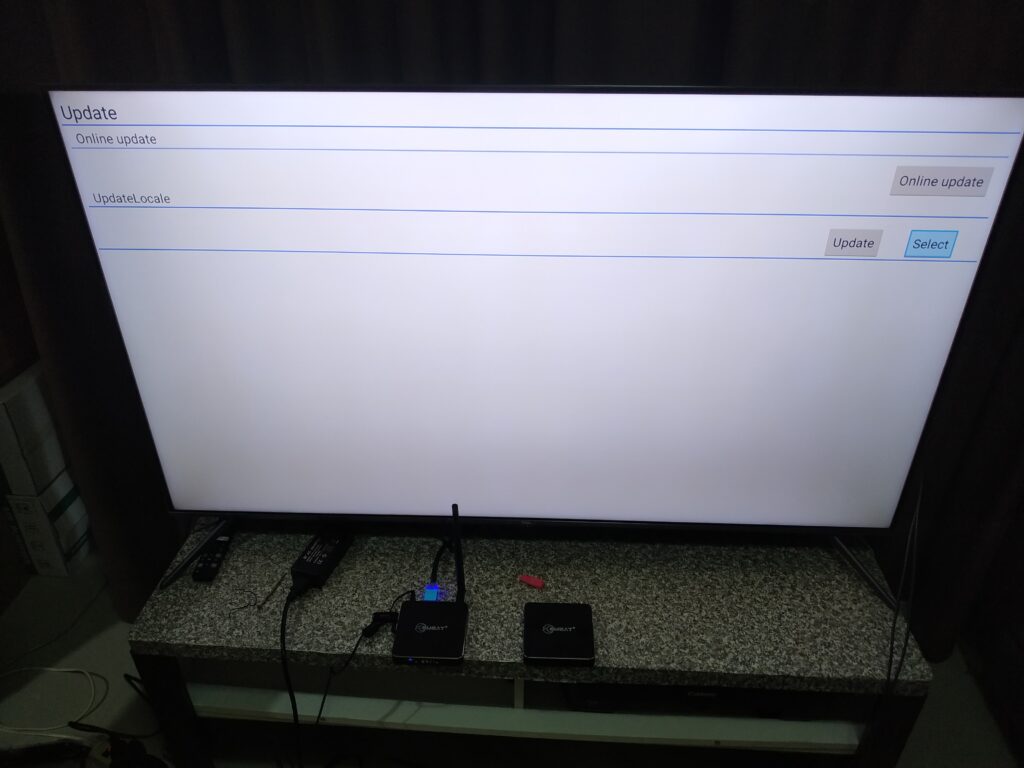
[/vc_column_text][vc_column_text]2. เข้าไปที่ Apps[/vc_column_text][vc_single_image image=”5954″ img_size=”large”][vc_column_text]3. เข้าไปที่ Update[/vc_column_text][vc_single_image image=”5955″ img_size=”large”][vc_column_text]4. กดที่ Select ดังภาพด้านล่าง[/vc_column_text][vc_single_image image=”5956″ img_size=”large”][vc_column_text]5. เลือกไฟล์ที่ชื่อดังภาพด้านล่าง franklin-ota-eng.robin.zip[/vc_column_text][vc_single_image image=”5957″ img_size=”large”][vc_column_text]5. จะพบชื่อ franklin-ota-eng.robin.zip แสดงอยู่ที่หน้านี้แล้ว

  • ให้ท่านทำการ กด Update ได้เลย

[/vc_column_text][vc_single_image image=”5959″ img_size=”large”][vc_column_text]6. กด Update แล้วรอ จนกว่าเครื่องจะอัพเดดเสร็จสิ้น[/vc_column_text][vc_single_image image=”5960″ img_size=”large”][vc_column_text]7. จะเป็นอัพเดดครับ รอจนหลอดเต็มครับ[/vc_column_text][vc_single_image image=”5962″ img_size=”large”][vc_message message_box_color=”black”]

EWEAT X9 FIRMWARE

  • หลังจากอัพเดดแล้ว ทาง EWEAT แจ้งว่าควรที่จะ Reset factory 1 ครั้ง
  • โดยไปที่ Setting >> Reset factory ครับ

[/vc_message][/vc_column][/vc_row]

[UPDATE FIRMWARE] Owlenz SD150 [รุ่นปกติ] การอัพเดด เพื่อเปลี่ยนหน้าเฟิมแวร์เครื่อง

[UPDATE FIRMWARE] Owlenz SD150 [รุ่นปกติ] การอัพเดด เพื่อเปลี่ยนหน้าเฟิมแวร์เครื่อง

[vc_row][vc_column][vc_column_text]การ Update SD150 เฟิมแวร์ เปลี่ยนหน้าตาใหม่ เฉพาะรุ่น SD150 ตัวธรรมดาเท่านั้น[/vc_column_text][/vc_column][/vc_row][vc_row][vc_column][vc_btn title=”กดที่นี้เพื่อโหลดไฟล์ชื่อ MERGE.bin” link=”url:https%3A%2F%2Fdrive.google.com%2Ffile%2Fd%2F1ZeLuuzmd7M8IqIUxwtrq7LQYdizjrD10%2Fview%3Fusp%3Dsharing||target:%20_blank|”][vc_message message_box_color=”black”]

  • โหลดไฟล์ที่ปุ่มด้านบนด้วยคอมพิวเตอร์ ท่านได้ไฟล์ที่ชื่อว่า  MERGE.bin
  • โยนไฟล์นี้เข้าไปที่ แฟลชไดร์ ของทางลูกค้าเอง โดยวางไว้หน้าแรกของแฟลชไดร์
  • นำแฟลชไดร์ไปเสียบที่ช่อง USB ของ OWLENZ SD150
  • จากนั้น กดปุ่ม M เพื่ออเข้าเมนู กดเลื่อลูกศรไปทางขวา จนถึงหน้า Setting
  • กดที่เมนุล่างสุด ที่เขียน Update Firmware >> ด้วย USB
  • กดแล้วจากนั้น กดปุ่ม < เพื่อเป็นการตกลง OK
  • รอเครื่องอัพเดดและ Boot ใหม่
  • ได้หน้าตาเฟิมแวร์ใหม่

[/vc_message][/vc_column][/vc_row]

[UPDATE FIRMWARE] Owlenz SD300S  รุ่น Android + Wifi

[UPDATE FIRMWARE] Owlenz SD300S รุ่น Android + Wifi

sweetiessundaes.com

[vc_row][vc_column][vc_btn title=”กดดาวโหลด เฟิมแวร์ SD300s ลงคอมพิวเตอร์ที่นี้ ล่าสุด 2020″ color=”danger” size=”lg” align=”center” i_icon_fontawesome=”fa fa-share-square-o” button_block=”true” add_icon=”true” link=”url:https%3A%2F%2Fdrive.google.com%2Ffile%2Fd%2F1EzLiRbZHk3kmlcEZ0B7pHld65Bqyn8AG%2Fview%3Fusp%3Dsharing||target:%20_blank|”][vc_custom_heading text=”คลิปวิดีโอสอนการ Update Firmware” google_fonts=”font_family:Actor%3Aregular|font_style:400%20regular%3A400%3Anormal”][vc_video link=”https://youtu.be/jgeKO_GD2Vk”][vc_single_image image=”4486″ img_size=”full”][/vc_column][/vc_row]

EGREAT A5/A10 Firmware เฟิมแวร์ EGREAT ล่าสุด

EGREAT A5/A10 Firmware เฟิมแวร์ EGREAT ล่าสุด

[vc_row][vc_column][vc_column_text]อัพเดดของ EGREAT A5/A10 ล่าสุด

Note: Egreat A5 EN firmware includes “Release” version and “Beta” version,
“Release” version firmware that you can download it click here
“Beta” version firmware is only for some enthusiasts who like to test some new problems and solved problems in advanced.

FIRMWARE ของเครื่อง A5 เท่านั้น

A5BD_EN_Firmware_20180426_v1.2.9.0.rar

https://haloolahraga.com/tim-nasional-sepak-bola-argentina-sejarah-prestasi-dan-bintang-lapangan/

I. info
A5BD_EN_Firmware_20180426_v1.2.9.0.rar
MD5: 8AA71B725E89FC2B4C5F55016C04F87D
DownloadLink:
http://data.egreatworld.com/A5BD_EN_Firmware_20180426_v1.2.9.0.rar

[/vc_column_text][vc_column_text]


FIRMWARE ของเครื่อง A10 เท่านั้น

A10BD_EN_Firmware_20180426_v1.2.9.0.rar

I. info
A10BD_EN_Firmware_20180426_v1.2.9.0.rar
MD5: 7A7A9779A1C0E154EE936DD501752502
DownloadLink:
http://data.egreatworld.com/A10BD_EN_Firmware_20180426_v1.2.9.0.rar[/vc_column_text][/vc_column][/vc_row][vc_row][vc_column][vc_column_text]

Egreat A5/A10 USB update instruction การอัพเดดเครื่องจากเมนูในตัวเครื่อง

1. Please download the forced recovery firmware from the company’s official website (www.egreatworld.com), the forced recovery firmware contains the following 4 files: update.zip, fastboot.bin, recovery.img, bootargs.bin
Please do not modify the file name, and copy these four files to the root directory of the U-disk of FAT32 disk format.
wwwwwww.png

2. Then insert the U-disk into any USB interface of this machine.

3.Then enter the “Setting” from the home page interface and enter “About”, select “USB update” option, select the letter of current drive(usually D) for U-disk or mobile hard disk in the drop-down option, after press the OK key to confirm, the system will automatically find the update firmware xxx.zip from, after completed the detection, the system will automatically complete the upgrade process. The TV screen will appear green android small robot animation icon during the process of upgrading, please be patient.

4. After the USB update is completed, this machine will automatically restart, after restart, the player can be normally put into use.

[/vc_column_text][/vc_column][/vc_row][vc_row][vc_column][vc_column_text]The steps for system forced refresh/recovery system are as follows.

การอัพเดดเครื่องจากการกดปุ่มนอกเครื่อง การอัพเดดแบบนี้จะทำให้แอปที่ลงเพิ่มเติมหายไป แต่ช่วยในการเคลียค่าทั้งหมดเป็นโรงงานและใช้เมื่อเครื่องมีปัญหาในการเปิดได้

1. Please download the forced recovery firmware from the company’s official website (www.egreatworld.com), the forced recovery firmware contains the following 4 files: update.zip, fastboot.bin, recovery.img, bootargs.bin
Please do not modify the file name, and copy these four files to the root directory of the U-disk of FAT32 disk format, and must be less than 32GB.
[​IMG]
2. Cut off the power supply of this machine, inset the U-disk into the USB3.0 interface of this machine, with a slender hard object (something like the clip after expansion) to insert into the RST small round hole, keep holding down the RST key in RST round hole not loosened, turn on the machine power after holding down the RST button.

[​IMG]
3. Keep the posture, release the RST button until the TV screen appears the prompt (the green android small robot animation icon) of being forced refresh/recovery system, the system will automatically complete the forced refresh/recovery system process. استمتع بمشاهدة
http://psycha.ru/ ! فيديوهات عربية للكبار، متنوعة وجودة عالية، تجربة آمنة وسريعة لكل محبي الإباحية.

4. Please be patient, after the forced refresh/recovery system is completed, this machine will automatically restart, after restart, the player can be normally put into use.

Note

[/vc_column_text][/vc_column][/vc_row]

Firmware Eweat W9II

Firmware Eweat W9II

[vc_row][vc_column][vc_custom_heading text=”EWEAT W9II”][/vc_column][/vc_row][vc_row][vc_column][vc_message message_box_color=”black”]


EWEAT W9II

Firmware Download

https://mega.nz/#!9Xh23IoJ!gjQOHPT9sOStGxvHMAG2inQsMNmYb1C_PS_T-Gid-zE[/vc_message][/vc_column][/vc_row][vc_row][vc_column][vc_message message_box_color=”mulled_wine”]DOWNLPD FIRMWARE EWEAT ล่าสุด X9[/vc_message][/vc_column][/vc_row][vc_row][vc_column][vc_column_text]

  • 1.เมื่อโหลดไฟล์แล้ว โยนไฟล์ชื่อ eweat-w9ii-3g-ota-20170915 .zip เข้าไปในแฟลชไดร์ครับ
  • โดยท่านต้องมีแฟลชไดร์ด้วยในการอัพเดดนี้

[/vc_column_text][vc_column_text]2. เข้าไปที่ Apps[/vc_column_text][vc_single_image image=”5954″ img_size=”large”][vc_column_text]3. เข้าไปที่ Update[/vc_column_text][vc_single_image image=”5955″ img_size=”large”][vc_column_text]4. กดที่ Select ดังภาพด้านล่าง[/vc_column_text][vc_single_image image=”5956″ img_size=”large”][vc_column_text]5. เลือกไฟล์ที่ชื่อดังภาพด้านล่าง eweat-w9ii-3g-ota-20170915 .zip[/vc_column_text][vc_single_image image=”5957″ img_size=”large”][vc_column_text]5. จะพบชื่อ eweat-w9ii-3g-ota-20170915 .zip แสดงอยู่ที่หน้านี้แล้ว

  • ให้ท่านทำการ กด Update ได้เลย

[/vc_column_text][vc_single_image image=”5959″ img_size=”large”][vc_column_text]6. กด Update แล้วรอ จนกว่าเครื่องจะอัพเดดเสร็จสิ้น[/vc_column_text][vc_single_image image=”5960″ img_size=”large”][vc_column_text]7. จะเป็นอัพเดดครับ รอจนหลอดเต็มครับ[/vc_column_text][vc_single_image image=”5962″ img_size=”large”][/vc_column][/vc_row]

H96 Pro plus Ram3GB/Rom32 Firmware Upgrade

H96 Pro plus Ram3GB/Rom32 Firmware Upgrade

FIRMWARE H96 Pro Plus Ram 3 GB

download ที่นี้ครับ https://mega.nz/#!XlEwXTjR!PuOu3x5ra8ru0N_cqyf342yLiOBT5gTAI2T_jPG-FK8


อุปกรณ์ที่ต้องเตรียมในการ Update เฟิมแวร์ (

1. คอมพิวเตอร์

2. USB to USB  (หาซื้อได้ตามร้าน IT หรือ สายที่ใช้่ External CD Drive)

3.ลงโปรแกรม USB burning tool https://drive.google.com/file/d/1jShkPDZc-bv9RWn7xRM9n3ELK3pN8dtt/view?usp=sharing

ลงโปรแกรม USB Burning tool ให้เรียบร้อยโดยกด

เปิดโปรแกรมขึ้นมาเลือกเปลี่ยนภาษา

3.1.นำสาย USB to USB มาเสียบเข้าด้านหลังช่อง USB ตัวกล่อง โดยเสียบ เข้า กล่องของ H96 Pro รูที่ไกล จาก ปุ่ม Reset

ลักษณะตัวสายที่ต้องใช้เพิ่มเติม

4.ให้เสียบเฉพาะ USB to pc และ กด Reset button (จุดเล็กๆ ค้างๆ USB) ค้างไว้พร้อมกัน โดยกด Reset button ค้างไว้ก่อน และค่อยเสียบสาย USB

ตัวอย่างเช่น Video นี้ครับ

ถ้าทำสำเร็จ จะ Connect Success เหมือนด้านล่าง

5.ให้โหลดเฟิมแวรืของตัวเครื่องมา

H96 Pro Ram 3GB Firmware แตกไฟล์ออก

หลังจากนั้น ให้ทำการเอาไฟล์ .img ที่ดาวโหลดมาได้ import โดยกด ที่ File >> import file

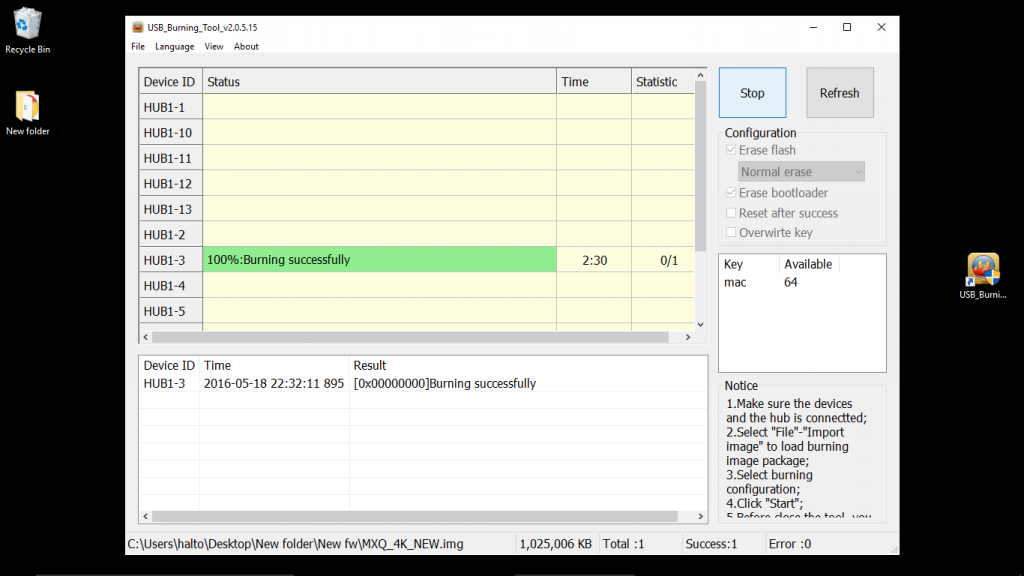
เลือก .img จากนั้นกด Start ด้านขวา (ถ้าเรียบร้อยต้องขึ้น Successful ในช่วงสุดท้าย ตามภาพด้านล่าง)

รอจน succesful เป็นอันใช้ได้ครับ


หากท่านทำไม่ได้หรืออุปกรณ์ไม่พร้อมส่งมาอัพเดดได้ครับ มีค่าจัดส่งคืน 50 บาท

ที่ www.peakhdplayer.com/fix

The versatility of the 1xBet platform means the bonus funds from your 1xbet promo code can often be used across a wide range of activities. While the sports welcome bonus is primarily for sports betting, the funds can typically be used to bet on sports, e-sports, virtual sports, and even financial betting. However, it is crucial to check the terms, as some sections like the casino or poker rooms are usually excluded from contributing towards the sports bonus wagering requirements. This allows for a diverse betting experience with your boosted capital.