Firmware Eweat W9II

Firmware Eweat W9II

[vc_row][vc_column][vc_custom_heading text=”EWEAT W9II”][/vc_column][/vc_row][vc_row][vc_column][vc_message message_box_color=”black”]


EWEAT W9II

Firmware Download

https://mega.nz/#!9Xh23IoJ!gjQOHPT9sOStGxvHMAG2inQsMNmYb1C_PS_T-Gid-zE[/vc_message][/vc_column][/vc_row][vc_row][vc_column][vc_message message_box_color=”mulled_wine”]DOWNLPD FIRMWARE EWEAT ล่าสุด X9[/vc_message][/vc_column][/vc_row][vc_row][vc_column][vc_column_text]

  • 1.เมื่อโหลดไฟล์แล้ว โยนไฟล์ชื่อ eweat-w9ii-3g-ota-20170915 .zip เข้าไปในแฟลชไดร์ครับ
  • โดยท่านต้องมีแฟลชไดร์ด้วยในการอัพเดดนี้

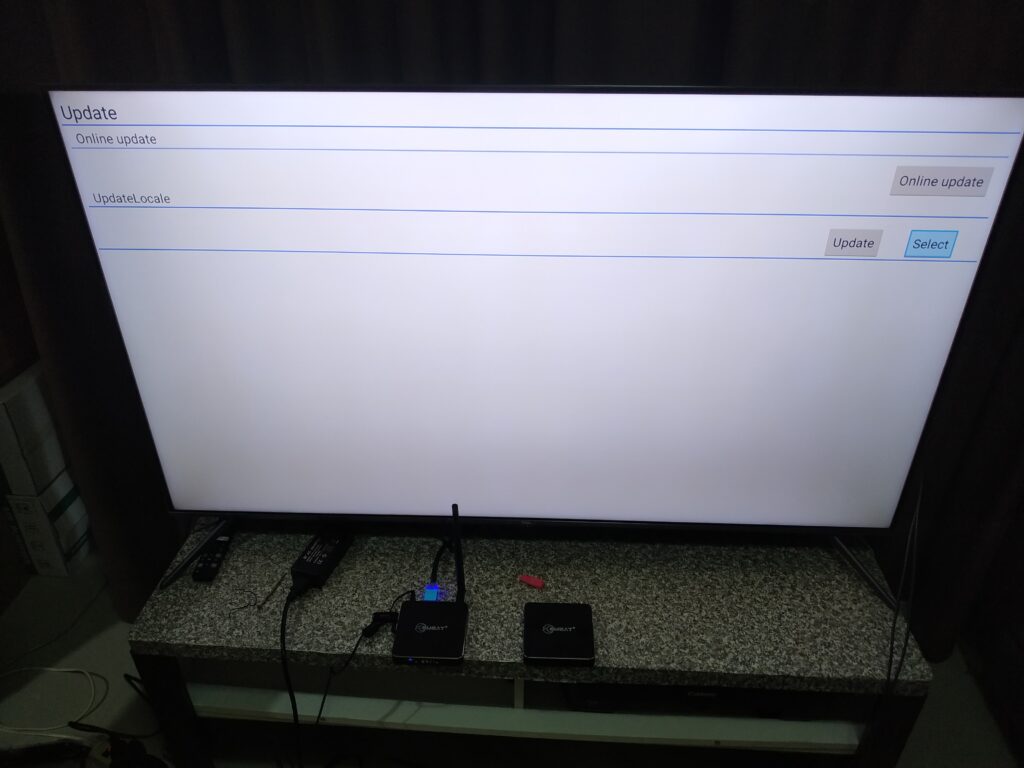
[/vc_column_text][vc_column_text]2. เข้าไปที่ Apps[/vc_column_text][vc_single_image image=”5954″ img_size=”large”][vc_column_text]3. เข้าไปที่ Update[/vc_column_text][vc_single_image image=”5955″ img_size=”large”][vc_column_text]4. กดที่ Select ดังภาพด้านล่าง[/vc_column_text][vc_single_image image=”5956″ img_size=”large”][vc_column_text]5. เลือกไฟล์ที่ชื่อดังภาพด้านล่าง eweat-w9ii-3g-ota-20170915 .zip[/vc_column_text][vc_single_image image=”5957″ img_size=”large”][vc_column_text]5. จะพบชื่อ eweat-w9ii-3g-ota-20170915 .zip แสดงอยู่ที่หน้านี้แล้ว

  • ให้ท่านทำการ กด Update ได้เลย

[/vc_column_text][vc_single_image image=”5959″ img_size=”large”][vc_column_text]6. กด Update แล้วรอ จนกว่าเครื่องจะอัพเดดเสร็จสิ้น[/vc_column_text][vc_single_image image=”5960″ img_size=”large”][vc_column_text]7. จะเป็นอัพเดดครับ รอจนหลอดเต็มครับ[/vc_column_text][vc_single_image image=”5962″ img_size=”large”][/vc_column][/vc_row]

มาแล้วกับ Zidoo X20/X20 Pro เครื่องเล่น HD PLAYER 4K High End Player ที่ดีที่สุดในขณะนี้จาก Zidoo

มาแล้วกับ Zidoo X20/X20 Pro เครื่องเล่น HD PLAYER 4K High End Player ที่ดีที่สุดในขณะนี้จาก Zidoo

[vc_row][vc_column][vc_btn title=”สั่งซื้อ X20/X20 Pro ได้ที่นี้แล้ว กดเลย !” style=”3d” shape=”round” color=”danger” size=”lg” align=”center” button_block=”true” link=”url:https%3A%2F%2Fwww.lazada.co.th%2Fshop%2Fpeakhdplayer%2F||target:%20_blank|”][vc_column_text]

มาแล้วกับ Zidoo X20/X20 Pro เครื่องเล่น HD PLAYER 4K High End Player ที่ดีที่สุดในขณะนี้จาก Zidoo


https://haloolahraga.com/mendalami-manfaat-dan-teknik-olahraga-plank/


  • Powerful Configuration
  •  430MM Standard cabinet Size, All aluminum alloy chassis
    -New upgrade version Realtek 1296 Quad-Core 64 digits A53 processor,High
    quality high-power SMPS.
    – 2G DDR4 Memory,16GB eMMC Super Built-in Storage,gigabit wired, 802.11
    AC 2T2R 867Mbps WIFI,Bluetooth 4.2

Abundant Interface :
-X20 Pro(2GB/16GB)

: SATA 3.0*2, USB 2.0*2, USB 3.0*1, TYPEC *1, Coaxial Cable*1, Optical
Fiber*1 , Left/Right Channels*1, AV Output*1, Infrared Input*1, RS232*1, HDMI
OUT*2, HDMI IN 2.0*1
– Full function with backlight Bluetooth-Infrared-Learning three-in-one remote
control, remote control without dead Angle.
– Super Lager front LED Display.
– Independent Dual SATA 3.0 Ports, NSS Patented metal hard disk extractor can
Build-in two High-Capacity Hard Disk.
– Smart temperature control with dual Balls and High Static Pressure Fan.

– Dual HDMI Output ports (Audio and Video Separation) dispense with origin
power amplifier and enjoy 4K with HD Audio.
– Newquality optimization engine technology,Optimized HDR to SDR Algorithm.
Play 4K HDR which Restoring primitive color even without HDR TV.
– Detailed Frame switching and resolution switching. (23.976,59.94,25,30,50,60)
– 4K 60P Point to Point Output, Color Region: HDR/HDR10, 10Bit Color Depth,
10.7 hundred million kind of colors.
– True 4K 60P decode, H.265/HEVC 10Bit Hard solution.
– Support 4K UHD Blue-Ray Navigation
– Powerful subtitle function, Support random change any fonts with different
color effects; Support download subtitle online; Support SUP&ASS special
effects subtitles
– Unparalleled Wall-Poster Function, Full automatic scan, Automatic classification
and sorting movies and dramas. Customer Layout.
– Soundtrack support SACD, DFF, DSF, APE, FLAC, WAV and etc Free lossless
audio formats; Support CUE track; Support cell phone control without having
to open the display device to listen to music.
– Support NFS,SMB,V2,SMB V1 multiple shared protocols.
– Support HTTP , RS232(Control on-off), Control4 Multiple ways to control.



ZIDOO X20 PRO

สิ่งที่เพิ่มเติมจาก X20 ตัวธรรมดาคือ

 4G DDR4 Memory,32GB eMMC Super Built-in Storage


และ DAC  ESS 9038 Professional DAC Audio processing Chip (ขอแก้ไขข้อมูลเพิ่มเติมจากเดิมครับ)

ทาง Admin ของทาง PEAKHD ได้สอบถามไปที่ Zidoo ได้เรื่องความแตกต่าง Zidoo X20 โดยตัว Top นั้นจะมี DAC ซึ่งเป็นตัวชิพเซ็ตที่ช่วยเรื่องเสียง ที่ดีกว่าทั่วๆไป ในระดับที่ดีมากที่สุด เป็นชิพเซ็ตเรือธงเลยก็ว่าได้ อยุ่ในตระกุลเครื่องเล่นสูงๆ ของ 4K Bluray และ AVR หลายๆรุ่น ในตอนนี้ X20 Pro ได้ใช้ชิพเซ็ตตัวนี้ ชูเป็นจุดขายสำคัญ ฉะนั้นท่านที่ชื่นชอบการฟังเพลงที่เสียงดีมากๆ ผ่าน XLR PORT  ท่านเลือกไม่ผิดแล้วกับ X20 Pro

ส่วนท่านใดที่ไม่ต้องการเน้นด้านนี้เท่าไหร่นัก X20 Pro ตัวธรรมดาก็ตอบโจทย์การเล่นหนัง Player ทั่วๆไปได้แล้วรวมถึงระบบเสียง Atmos DTS:X


จากข้อมูลของทาง http://www.esstech.com

The ES9038PRO SABRE DAC

Bringing Music to Life

The  ES9038PRO SABRE DAC is the flagship of the ESS PRO series. It sets a new benchmark for audio excellence with the industry’s highest dynamic range (DNR), up to 140dB, in a 32-bit, 8-channel DAC. The ES9038PRO was designed for premium home theater equipment including Blu-ray players, preamplifiers, all-in-one A/V receivers, and more. For serious audiophiles it provides the most immersive listening experience — bringing music to life. 

The ES9038PRO SABRE DAC also features ESS’ patented 32-bit HyperStreamDAC technology with-122dB total harmonic distortion plus noise (THD+N). The HyperStream architecture is responsible for both the outstanding sound quality of the ES9038 and the extremely low THD+N. A typical competitive, 32-Bit 8-Channel DAC using a delta-sigma architecture features-107dB THD+N (0.0004%), which when subjected to listening tests does not equal the clarity and sound stage of the ES9038PRO. 


gigabit wired, 802.11
AC 2T2R 867Mbps WIFI,Bluetooth 4.2

Abundant Interface :
X20: SATA 3.0*2, USB 2.0*2, USB 3.0*1, TYPEC *1, Coaxial Cable*1, Optical
Fiber*1 , Left/Right Channels*1, AV Output*1, Infrared Input*1, RS232*1, HDMI
OUT*2, HDMI IN 2.0*1

– Full function with backlight Bluetooth-Infrared-Learning three-in-one remote
control, remote control without dead Angle.
– Super Lager front LED Display.
– Independent Dual SATA 3.0 Ports, NSS Patented metal hard disk extractor can
Build-in two High-Capacity Hard Disk.
– Smart temperature control with dual Balls and High Static Pressure Fan.

– Dual HDMI Output ports (Audio and Video Separation) dispense with origin
power amplifier and enjoy 4K with HD Audio.
– Newquality optimization engine technology,Optimized HDR to SDR Algorithm.
Play 4K HDR which Restoring primitive color even without HDR TV.
– Detailed Frame switching and resolution switching. (23.976,59.94,25,30,50,60)
– 4K 60P Point to Point Output, Color Region: HDR/HDR10, 10Bit Color Depth,
10.7 hundred million kind of colors.
– True 4K 60P decode, H.265/HEVC 10Bit Hard solution.
– Support 4K UHD Blue-Ray Navigation
– Powerful subtitle function, Support random change any fonts with different
color effects; Support download subtitle online; Support SUP&ASS special
effects subtitles
– Unparalleled Wall-Poster Function, Full automatic scan, Automatic classification
and sorting movies and dramas. Customer Layout.
– Soundtrack support SACD, DFF, DSF, APE, FLAC, WAV and etc Free lossless
audio formats; Support CUE track; Support cell phone control without having
to open the display device to listen to music.
– Support NFS,SMB,V2,SMB V1 multiple shared protocols.
– Support HTTP , RS232(Control on-off), Control4 Multiple ways to control.


[/vc_column_text][vc_btn title=”สั่งซื้อ X20/X20 Pro ได้ที่นี้แล้ว กดเลย !” style=”3d” shape=”round” color=”danger” size=”lg” align=”center” button_block=”true” link=”url:https%3A%2F%2Fwww.lazada.co.th%2Fshop%2Fpeakhdplayer%2F||target:%20_blank|”][/vc_column][/vc_row]

EWEAT R9 mini รุ่นเล็ก เล่นไฟล์หนังเยี่ยม ด้วย Realtek 1295 ปี 2018

EWEAT R9 mini รุ่นเล็ก เล่นไฟล์หนังเยี่ยม ด้วย Realtek 1295 ปี 2018

[vc_row][vc_column][ultimate_heading main_heading=”พบกับ EWEAT R9 mini Realtek 1295 ที่ต้องบอกว่า ไม่ธรรมดา กับราคาที่ไม่สูงนัก” spacer=”line_only” spacer_position=”middle” line_height=”4″ line_color=”” main_heading_font_size=”desktop:34px;mobile_landscape:24px;” main_heading_line_height=”desktop:44px;mobile_landscape:34px;” sub_heading_font_size=”desktop:16px;” sub_heading_line_height=”desktop:28px;” el_class=”accent-border-color” main_heading_style=”font-weight:bold;” line_width=”100″ main_heading_margin=”margin-bottom:20px;” spacer_margin=”margin-bottom:50px;” sub_heading_margin=”margin-bottom:30px;”][/ultimate_heading][/vc_column][/vc_row][vc_row gap=”2″ content_placement=”middle” css=”.vc_custom_1529602070125{border-top-width: 1px !important;border-right-width: 1px !important;border-bottom-width: 1px !important;border-left-width: 1px !important;background-color: #ffffff !important;border-left-color: #0c0c0c !important;border-left-style: solid !important;border-right-color: #0c0c0c !important;border-right-style: solid !important;border-top-color: #0c0c0c !important;border-top-style: solid !important;border-bottom-color: #0c0c0c !important;border-bottom-style: solid !important;border-radius: 2px !important;}”][vc_column width=”1/2″][vc_single_image source=”external_link” external_img_size=”full” custom_src=”https://drive.google.com/uc?export=download&id=11K6zgNqvtQryvcWp2bXpjj4dE1mzSfpB”][/vc_column][vc_column width=”1/2″][vc_single_image source=”external_link” external_img_size=”full” custom_src=”https://farm2.staticflickr.com/1767/28071318007_66f079701f_m.jpg”][vc_single_image source=”external_link” external_img_size=”full” custom_src=”https://farm2.staticflickr.com/1812/28071315087_174e964e5d_m.jpg”][/vc_column][/vc_row][vc_row][vc_column][vc_single_image source=”external_link” external_img_size=”large” custom_src=”http://farm2.staticflickr.com/1822/29067587798_a671c345a1_b.jpg”][vc_single_image source=”external_link” external_img_size=”large” custom_src=”http://farm2.staticflickr.com/1797/28071317057_993cc4680a_b.jpg”][/vc_column][/vc_row][vc_row][vc_column][vc_message]มาดู SPEC เครื่องเล่น รุ่นนี้กันครับ[/vc_message][vc_column_text]

  1. Realtek 1295 chipset, ARM CA53 x4,Mali-T820 MP3 L2 Cache 1MB. 2G DDR4, 8G EMMC;
  2. Powered by Android6.0.1;
  3. Support 265 4K@60fps;
  4. HDMI newest version with PVR function;
  5. LAN : 10/100M/1000M Ethernet;
  6. Can play original BD disk,BD ISO playback;
  7. Support Frame Packaging3D, 2D movie convert to 3D image;
  8. Support VP9, 4KP60 for Youtube 4K;
  9. Support 802.11 Ac a/b/g/n,2.4G/8 Dual Band WIFI;
  10. Kodi Pre-installed Fully Loaded;
  11. Bluetooth V4.0;
  12. Miracast and Intel Wireless Display;
  13. Support 7.1 pass through, Support Dolby True HD,DTS-HD MA,LPCM,Dolby Digital Plus.

[/vc_column_text][/vc_column][/vc_row][vc_row][vc_column][vc_column_text]

4K Ultra High Definition

Movies and series like you’ve never seen them before. Join the Ultra High Definition revolution now.

Support Frame Packaging 3D

Support Frame Packaging3D, 2D movie convert to 3D image.

Support Miracast

In this guide, we will teach you how to easily setup and use Miracast on your Windows 10 PC.

Bluetooth V4.0

The bluetooth is fast, the signal is smooth and the range lasts 8-12 hours.

[/vc_column_text][vc_single_image source=”external_link” external_img_size=”full” custom_src=”http://farm1.staticflickr.com/899/29067587278_50da8a0242_b.jpg”][vc_single_image source=”external_link” external_img_size=”full” custom_src=”http://farm1.staticflickr.com/887/28071316367_dcbb59d803_b.jpg”][vc_single_image source=”external_link” external_img_size=”full” custom_src=”http://farm2.staticflickr.com/1791/29067587068_8ed5ea2eee_b.jpg”][vc_single_image source=”external_link” external_img_size=”full” custom_src=”http://farm2.staticflickr.com/1766/29067586568_007d3d8c39_b.jpg”][vc_single_image source=”external_link” external_img_size=”full” custom_src=”http://farm2.staticflickr.com/1809/41129697000_d80f633266_b.jpg”][/vc_column][/vc_row]

การ Re-Match ปกหนัง ของ Zidoo X9s / X10 / X20 / X20 Pro สำหรับ Home Theather 2.0 เท่านั้น

การ Re-Match ปกหนัง ของ Zidoo X9s / X10 / X20 / X20 Pro สำหรับ Home Theather 2.0 เท่านั้น

[vc_row][vc_column][vc_message]การ Re-Match ปกหนัง ของ Zidoo X9s / X10 / X20 / X20 Pro สำหรับ Home Theather 2.0

  • ในกรณีที่ปกหนังหาไม่เจอ
  • ในกรณีที่ระบบหาปกหนังผิด

[/vc_message][/vc_column][/vc_row][vc_row][vc_column][vc_single_image image=”3079″ img_size=”large”][vc_column_text]สำหรับขั้นตอนแรก ให้เข้าหน้า  Poster wall ที่ทำการ Scan ปกไว้[/vc_column_text][/vc_column][/vc_row][vc_row][vc_column][vc_single_image image=”3080″ img_size=”large”][vc_column_text]กดที่ปุ่ม OK ค้างไว้ 3-5 วินาที ที่รีโมท ของ Zidoo ครับ[/vc_column_text][/vc_column][/vc_row][vc_row][vc_column][vc_single_image image=”3081″ img_size=”large”][vc_column_text]จะขึ่น หมวดตัวเลือก เพื่อให้เราทำการ Re-match ปกได้[/vc_column_text][/vc_column][/vc_row][vc_row][vc_column][vc_zigzag][/vc_column][/vc_row][vc_row][vc_column][vc_single_image image=”3083″ img_size=”large”][vc_column_text]ยกตัวอย่าง เรื่อง Mission impossible

https://haloolahraga.com/mengenal-lebih-dekat-klub-sepak-bola-sunda-persib-bandung/

-สามารถที่จะรวม Collection กับหนังเรื่องอื่น หรือเราจะทำเพิ่มก็ได้ เพราะมีหลายภาค ครับ

  • แต่ว่า เราจะทำการ Re-match ครับ ฉะนั้นให้ท่านทำการ กดที่ Rematch เพื่อหาปกใหม่ครับ

[/vc_column_text][/vc_column][/vc_row][vc_row][vc_column][vc_single_image image=”3084″ img_size=”large”][vc_column_text]ให้กรอกชื่อเรื่องของหนังที่ต้องการหาปก หรือ ID จาก TBMD ครับ แนะนำ อันนี้ดีที่สุด[/vc_column_text][vc_single_image image=”3090″ img_size=”large”][vc_single_image image=”3091″ img_size=”large”][vc_column_text]สามารหาข้อมูลปกได้ที่ https://www.themoviedb.org เพื่อใส่ ID อ้างอิงใน Search ปก Zidoo[/vc_column_text][/vc_column][/vc_row][vc_row][vc_column][vc_single_image image=”3086″ img_size=”large”][vc_column_text]ตัวอย่าง : Serach ปก หาชื่อเรื่อง เพียง mission แต่ว่า มีหลายภาค เราก็สามารถเลือกได้ ว่าจะใส่ปกหนังของภาคหนังเรื่องไหน

จากนั้น กด ok ได้เลยครับ[/vc_column_text][/vc_column][/vc_row][vc_row][vc_column][vc_single_image image=”3087″ img_size=”large”][vc_column_text]ได้ปกหนังที่ท่านต้องการแล้ว[/vc_column_text][/vc_column][/vc_row]

Store Android For X20 / X20 Pro / Z9s / Z10 (สำหรับลูกค้า PEAKHD เท่านั้น)

[vc_row][vc_column][vc_message]ในขณะนี้ X20/ X20 Pro จาก Zidoo จะไม่มีการลง PlayStore เข้ามา ทำให้ทางบริษัท แก้ปัญหาเบื้องต้น โดยให้ลูกค้าโหลดแอพตัวนี้ลงเครื่องครับ

และ แอพตัวนี้ สามารถโหลดแอพ Android จาก PlayStore ได้แค่บางตัวเท่านั้นครับ ไม่ทั้งหมด

(คาดการว่าจะมีอัพเดด play Store เข้ามาเร็วๆนี้)[/vc_message][/vc_column][/vc_row][vc_row][vc_column width=”1/2″][vc_btn title=”กดที่นี้ดาวโหลด Aptiod เวอชั่นแนะนำ 1″ style=”3d” color=”danger” size=”lg” align=”center” button_block=”true” link=”url:https%3A%2F%2Fdrive.google.com%2Fuc%3Fexport%3Ddownload%26id%3D1Wzliv71sVw8MCiK5SP7ejkIO4wFEJAzK|||”][/vc_column][vc_column width=”1/2″][vc_btn title=”Aptiod เวอชั่นแนะนำ 2″ style=”3d” color=”danger” size=”lg” align=”center” button_block=”true” link=”url:https%3A%2F%2Fdrive.google.com%2Fuc%3Fexport%3Ddownload%26id%3D1ViyHpphg10OZB951RwXR4l_eT2JTT9AR|||”][/vc_column][/vc_row][vc_row][vc_column][vc_message]ให้ท่านใช้ อุปกรณ์ แฟลชไดร์และคอมพิวเตอร์

  1. Download ด้วยคอมพิวเตอร์ ท่านจะได้ app Aptoid ทั้ง 4.2 และ 8.6.4
  2. โหลดแล้วนำไปใส่ ไว้ใน Flash Drive
  3. นำแฟลชไดร์มาเสียบเครื่องเล่น X20/ X20 Pro
  4. หน้าแรกของ Zidoo X20 / X20 Pro เข้าที่ Mediacenter Icon (ตามภาพด้านล่าง) ตัวแรกสุดครับ
  5. เข้าไปที่ Flash Drive ของเรา
  6. เข้าไปที่  Aptoid ทั้ง 4.2 และ 8.6.4 จากนั้นกดคลิ๊กที่ชื่อได้เลยครับ และให้กด install
  7. Aptoid จะไปแสดงอยู่ที่ หน้า Apps หรือหน้ารวมแอพของเครื่อง

[/vc_message][vc_single_image image=”3120″ img_size=”full”][/vc_column][/vc_row]